

If half your trip plan lives in a pile of saved TikToks, you need those clips on your phone before the signal drops. Downloading TikTok videos to watch offline fills a gap your maps app leaves: Google Maps offline areas skip walking, cycling and transit directions, so a saved clip of the airport train or a tricky trail junction may be the only walk-through you have.
Below are the three ways to save TikToks, the clips worth keeping, how to download them in three taps and how to organise them so the right one turns up fast.
Quick Answer: How to Watch TikTok Videos Offline
- Specific clips you choose: use TikTok’s own Save video button when the creator allows downloads. If you use a browser downloader, only save videos you own the rights to or have permission to download.
- Something to scroll on the plane: TikTok’s Offline videos setting stores a batch from your For You feed, but you can’t pick which ones.
- When to do it: the night before you leave, on home Wi-Fi, so none of it touches your roaming allowance.
- Where they go: your photo library or gallery when you use TikTok’s button, and the Files app on an iPhone when you download through Safari.

Why Bookmarked TikToks Let You Down on a Trip
Tapping the bookmark in TikTok feels like you’ve saved a video. You haven’t. You’ve saved a link, and that link needs a connection every time you open it. That works on the sofa and falls apart on the road for four reasons.
- No signal where you need it most: mountain trails, ferries, rural roads and underground stations. If you’re heading north, our guide to signal, Wi-Fi and apps on a Scotland road trip covers where the coverage gaps are.
- Roaming costs: EU roaming charges for UK customers are no longer capped, and Ofcom tells holidaymakers to avoid streaming video on mobile data abroad. Our explainer on whether an eSIM works overseas for UK travellers is worth a read before you fly.
- Patchy hotel Wi-Fi: buffering a 30-second clip in the lobby while the taxi waits is nobody’s idea of fun.
- Disappearing posts: creators delete videos or make their accounts private, and the hidden-beach tip goes with them.
A downloaded video plays from your phone’s storage, with no connection and no data.
Three Ways to Save TikTok Videos for Offline Viewing
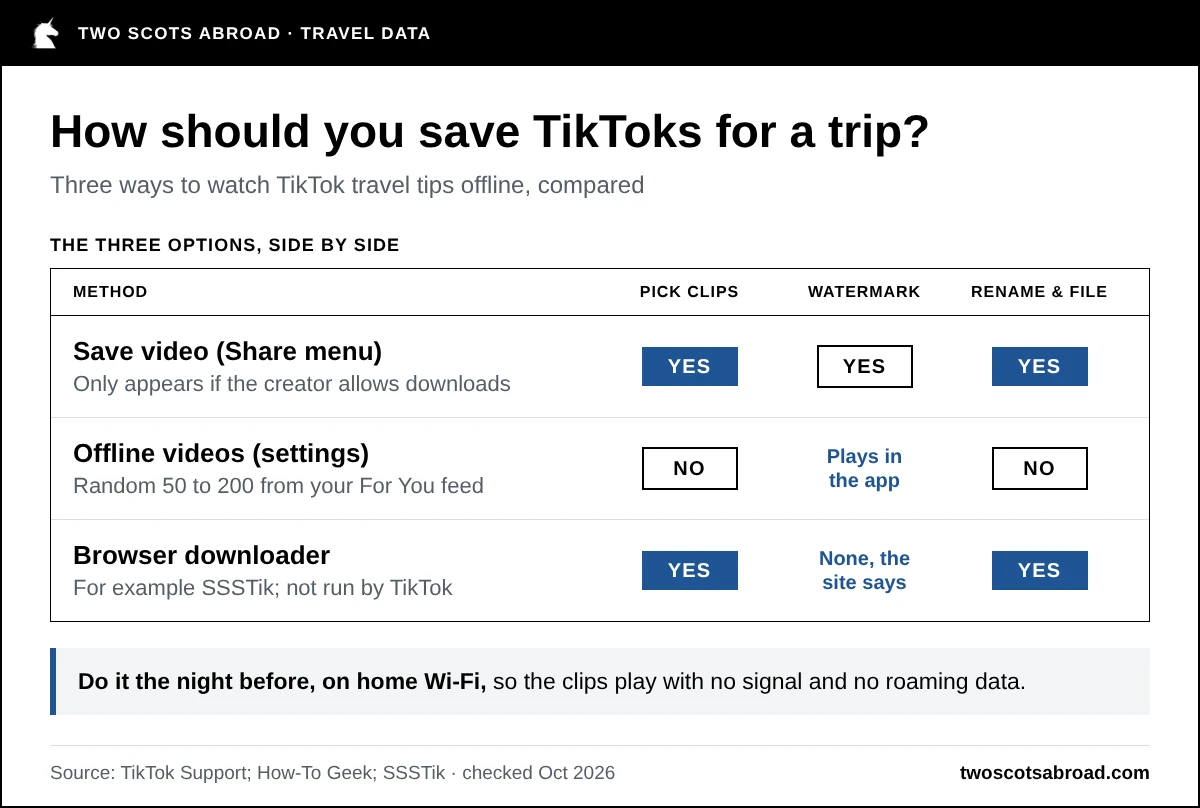
TikTok has two built-in options, and browser downloaders add a third. They suit different jobs.
| Method | You choose the clips? | Watermark | Main catch |
|---|---|---|---|
| Save video (Share menu in TikTok) | Yes | Yes | Only works when the creator allows downloads |
| Offline videos (TikTok settings) | No, picked from your For You feed | Plays inside the app | Random batch of 50 to 200 videos |
| Browser downloader such as SSSTik | Yes | None, the site says | Third-party site, not run by TikTok |
Save video is the simplest. Open the video, tap Share and choose Save video. If Save video doesn’t appear, the creator doesn’t allow downloads, and TikTok switches downloads off by default for private accounts and under-16s.
Offline videos lives under Settings and privacy, in the Cache and cellular section. It downloads 50 to 200 clips picked from your For You page, which is handy for a long flight and useless for finding the one ferry clip you saved in March.
A browser downloader is another way to save videos you own the rights to or have permission to download. You choose the clip, and you get an ordinary video file you can rename and file by destination.
Here’s how the three options stack up side by side.
Which TikTok Travel Videos Are Worth Saving?
Your downloads work best as a personal guidebook, sorted by what you’ll need on the ground. The clips that earn their storage space are the ones you’ll need when time is short and the signal is weak.
| Type of clip | Why it helps offline | File name example |
|---|---|---|
| Ticket machines and airport trains | Walking and transit directions don’t work in offline maps | Airport train ticket |
| Food and markets | Shows the dish and the counter so you can order with confidence | Day 2 lunch, market stall name |
| Trails and viewpoints | Shows the terrain and the junctions before you commit | Day 3 coastal path, car park start |
| Packing and plug adapters | Catches the forgotten item while you can still buy it | Adapter type for the trip |
| Phrases and etiquette | Easier to replay than reading a phrasebook | How to greet and tip |
Getting Around
Clips showing how a ticket machine works, which airport train to take or how a city’s transport card works are the most useful ones to keep. Save these first, because you’ll want them at the exact moment you’re standing at the machine with a queue behind you.
Food and Drink
Save recommendations for local dishes, markets and specific places to eat. Put the restaurant name in the file name, so you can search for it in your maps app later.
Hikes and Viewpoints
Short trail videos show the terrain and what the view looks like, which helps you decide whether a route suits your fitness and footwear. A clip from someone else’s sunny day is no substitute for a map, though. Download an offline map and check the official trail information before you set off, and if you’re still putting your kit together, our hiking gear packing list covers the basics.
Packing, Phrases and Etiquette
Packing videos, plug adapter explainers and “what I wish I’d known” clips are worth saving a few weeks before departure, while there’s still time to buy what you’ve forgotten. A quick clip on greeting people, tipping or ordering politely in the local language is easier to replay on a train than flicking through a phrasebook.
How to Download TikTok Videos in Three Steps
SSSTik is a free downloader that runs in your phone’s browser, so there’s no extra app to install before your trip.
Before you download: the steps below are for videos you own the rights to or have the rights holder’s permission to download. Make sure that permission covers what you plan to save, including any music or other material in the clip.
Respect a creator’s settings. If a creator has switched downloads off, jot down the place name or take a note and look up the details yourself. Don’t use a downloader to bypass that setting.
- Open the video in TikTok, tap Share and choose Copy link.
- Paste the link into the box on SSSTik.
- Tap Download and choose MP4 for video, or MP3 if you only need the audio, such as a walking tour you can listen to with your phone in your pocket.
The site says it saves videos without the TikTok watermark and in HD where the original upload allows it. SSSTik isn’t affiliated with TikTok, so treat it like any other website: download the video and ignore any extra pop-ups or offers.
On an iPhone, Safari saves downloads to the Downloads folder in the Files app, and you can move a video to Photos from there. On Android, downloads usually land in your Downloads folder or gallery.
Do your saving at home on Wi-Fi. A quick tik tok download for a clip you have permission to save costs nothing extra when you do it the night before, which is more than you can say for streaming it on roaming data.
How to Organise Your Offline TikTok Folder
- Make an album or folder for each destination, because scrolling through 300 unnamed files on a ferry is miserable.
- Rename each file clearly (“Day 2 old town walking route”, “Airport train ticket”), because Files and most gallery apps can search by name.
- Check your phone storage before you go, because short clips are small but a few hundred add up.
- Clear out what you didn’t use after the trip and keep the good ones for next time.
If you post your own travels on TikTok, save your own videos too. The edited version, with its music and captions, often only exists in the app once the raw footage has been cleared off your phone to make space.
Before You Rely on a Saved TikTok Travel Tip
- Information dates quickly. Opening times, prices and trail conditions change, so check official sources before you rely on a clip.
- Personal use isn’t automatic permission. Watching a clip on your own trip or crediting its creator does not automatically give you the right to download or repost it. Check that you have permission for the use you intend.
If some of your travel ideas live on Facebook as well, fGet uses the same copy-and-paste steps to save public Facebook videos and Reels. Use it only for videos you own the rights to or have the rights holder’s permission to download, including any music or other material in them. A public post is not automatic permission to copy or repost a video. Respect the creator’s restrictions and privacy settings.
Downloading TikTok Videos to Watch Offline: FAQs
Can You Watch TikTok Offline Without Downloading Anything?
Only through TikTok’s Offline videos setting, which stores a batch of 50 to 200 videos from your For You feed while you’re connected. You can’t choose which videos it saves, so it won’t help you find a specific travel tip.
Why Can’t I Save Some TikTok Videos?
A missing Save video option means the creator has turned off downloads for their videos. TikTok also turns downloads off by default for private accounts and accounts belonging to under-16s.
Where Do Downloaded TikTok Videos Go on an iPhone?
Videos saved with TikTok’s Save video button go to your photo library. Videos downloaded through Safari go to the Downloads folder in the Files app, and you can move them to Photos from there.