
If a big game launches while you are away, keeping up mostly comes down to two things: a connection that holds a steady ping, and knowing when your daily and weekly resets land in the local time where you are standing. Bandwidth matters less than most people expect. GeForce NOW needs 15 Mbps for 720p at 60 FPS and 25 Mbps for 1080p at 60 FPS, but also wants under 80 ms of latency, and recommends under 40 ms.
This guide covers what to check before you book a room, what is worth packing, whether a handheld or cloud gaming suits a trip, how to avoid roaming bills, and how to convert reset times so a short session each day keeps you level with everyone else.
How much connection does a launch-week session need?
Those GeForce NOW figures are the floor for cloud play. For hotel Wi-Fi in general, the target is 25 Mbps and up.
The two numbers below show what a cloud gaming session asks of a hotel connection.
A game you install locally needs less bandwidth once it is running, but ping still decides whether combat feels fair. Treat latency as the number to test, and treat the headline speed in a listing as a rough guide only.
How do you check hotel or Airbnb Wi-Fi before booking?
Ask the property for its connection speed in writing before you pay. Email the front desk, check a speed database such as hotelwifitest.com for well-known chains, and read recent reviews for network complaints. For an Airbnb, message the host and ask for a recent speed test screenshot, whether the router is in the same room as the desk, and whether there is a wired port.
Once you arrive, run a speed test at the spot where you will actually play, then check ping to a game server or a cloud gaming data centre. A steady 30 to 50 ms often feels better than a faster line that spikes, and shared hotel networks tend to spike in the evening when other guests are streaming.
Is a travel router or Ethernet adapter worth packing?
For a launch window, yes. A wired connection usually gives lower and steadier ping than Wi-Fi, and a small travel router plugged into the room’s Ethernet port can serve your console, laptop and phone on a network that is more private than the hotel’s public Wi-Fi. Basic travel routers cost about $40 and advanced ones start around $80.
Two cautions apply. Some hotels have disabled the room’s Ethernet port or removed it, so ask first. And if the only connection is Wi-Fi, a router that joins the hotel network wirelessly still helps with captive login pages and with keeping several devices on one login, but it cannot beat the hotel’s own line.
For a laptop with no network port, a USB-C Ethernet adapter and a short flat cable weigh almost nothing. A phone hotspot is the fallback, best with an unlimited plan and a strong signal.

We earn a commission if you buy through this link, at no extra cost to you.
 Prime
We earn a commission if you buy through this link, at no extra cost to you.
Should you play on a handheld or through cloud gaming?
A handheld that installs the game locally keeps working through patchy Wi-Fi, because only the matchmaking and server traffic needs the network. That suits long train journeys and flights, where you can play offline content and sync progress later. Cloud gaming suits the opposite case: a good wired line in the room and no wish to carry hardware. GeForce NOW works best on a wired Ethernet connection or 5 GHz Wi-Fi, so skip it if the room only offers a crowded 2.4 GHz network.
If your game has a launch-week server queue or a timed event, a locally installed copy is the safer choice. Download it at home first, because the day-one patch will be the largest transfer you do all trip.
How much roaming data will a launch cost you?
Keep game downloads and updates on Wi-Fi, and keep your phone for logins and companion apps. Roaming rules differ by network, and operators in the EU may apply a fair use policy that limits how much data you can use at your domestic price. Any surcharge is capped by the EU wholesale limit of €1.10 a GB plus VAT in 2026, which falls to €1 a GB from 2027.
That page covers EU rules, so check your own provider’s terms for the country you are visiting, including any daily roaming charge and the monthly data cap. If you plan to tether a console to your phone, read the cap before you leave.
How do you work out reset times across time zones?
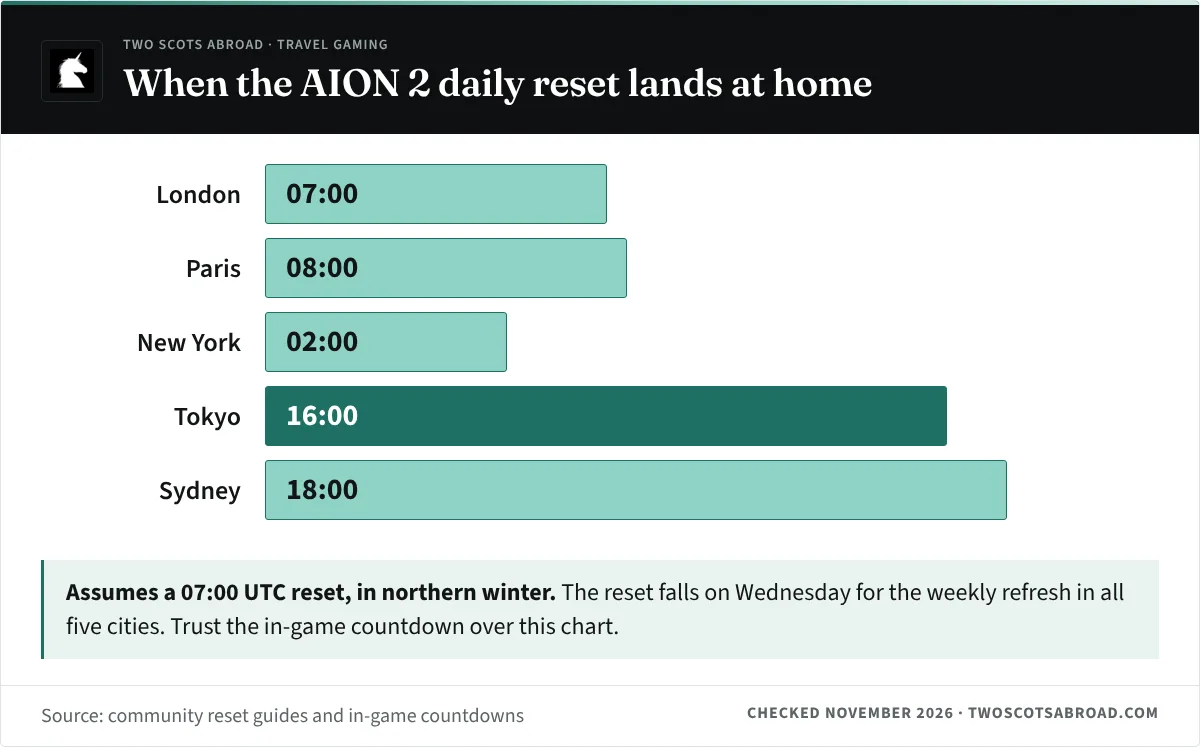
Reset times decide what you can skip. Your game’s official site, patch notes or in-game timer will give its reset; AION 2 works as an example. Community guides place the daily reset at 16:00 server time, which most put at 07:00 UTC, with the weekly reset on Wednesday at the same hour. NCSOFT has not published which time zone the global server clock uses, so treat the UTC conversion as community-reported, and trust the in-game countdown for “Daily recharge in” and “Weekly recharge in” over any converted time.
| City | Daily reset (northern winter) |
|---|---|
| London | 07:00 |
| Paris | 08:00 |
| New York | 02:00 |
| Tokyo | 16:00 |
| Sydney | 18:00 |
If the reset is fixed to UTC, it shifts by an hour in local time when clocks change. Paris, for example, sees it at 09:00 in summer and 08:00 in winter. Set a phone alarm for the local time rather than the server time, and recheck it after any clock change on your route.
When the reset lands in the middle of a sightseeing day, the aim is a short session, not a grind. The AION 2 daily and weekly activity checklist on TalentBuilds lists what to clear each reset, so you can finish your dailies in a short session and get back to the trip.
FAQ
What ping is good enough for a new game launch?
For cloud gaming, under 80 ms to the data centre is required and under 40 ms is recommended. For a locally installed game, steadier is better than lower, so test at the time of day you plan to play.
Is hotel Wi-Fi safe for logging into my game account?
Public networks are shared, so use a VPN whenever you connect to one. A phone hotspot keeps your devices off the hotel’s network entirely; a travel router puts them on a private network of your own, but its traffic still crosses the hotel’s line, so keep the VPN on.
Is the AION 2 reset time official?
Not fully. Community guides report 16:00 server time and often convert it to 07:00 UTC, but NCSOFT has not published the time zone. Use the in-game countdown as your source of truth.